PLAYBOOK · CUSTOMER OPERATIONS
Run closed-system customer support grounded in your data.
Public LLMs hallucinate, leak context, and never quite know your product. This playbook stands up a customer support agent that calls a Custom HTTP tool, retrieves answers from your own indexed knowledge base via Private RAG, and runs entirely on your infrastructure — no customer message ever leaves your network.
The hard part of an AI-powered support stack is not the model — it is the integration surface. Your help center, your order system, your refund logic, and your CSAT signals all live in different places. VDF AI gives you one place to wire them together: a Network that grounds every answer in your indexed knowledge, calls your back office through typed tools, and ships an audit trail any compliance team will accept.
The problem
Generic chatbots can't speak your product
Most assistants either invent facts or send queries to a third-party model that has never seen your knowledge base. Support leaders need answers that are accurate, auditable, and entirely contained inside the organization's perimeter.
The VDF AI approach
Grounded answers, traceable tools, sovereign data
Wire a Custom HTTP tool to your back-office API (orders, accounts, tickets), index your help center and product docs into pgvector, and let a Network compose retrieval, drafting, and validation agents on every customer turn.
WHY THIS MATTERS NOW
Customer support is the front line of AI trust
Customers no longer accept "we can't find that in our system." They expect a support touchpoint to remember the last conversation, know the order status, cite the right policy, and resolve the issue in a single turn. Public chatbots try to deliver that — but they do it by sending every message to a model your privacy team did not approve and your legal team did not contract.
VDF AI inverts that pattern. The Custom HTTP tool becomes the only path to your back office. The Private RAG becomes the only source of factual claims. The agent is structurally incapable of answering from outside those bounds — and every retrieved chunk is logged, so a compliance reviewer can replay any conversation a year later.
WHAT YOU NEED TO START
Prerequisites for a two-week pilot
Content
- Help center or knowledge base export
- Product manuals (PDF or HTML)
- Recent ticket exemplars with resolutions
- Tone-of-voice and brand style guide
Back-office surface
- Read endpoint for orders or accounts
- (Optional) write endpoint for ticket create
- Bearer or service-account auth
- Rate-limit headroom for agent calls
People
- One support operations lead
- One CX writer for voice tuning
- One data owner for index curation
- Optional: a fraud or risk reviewer for escalation
REFERENCE ARCHITECTURE
A closed system for trustworthy answers
Confluence · PDFs · Web
pgvector · feature-list scoped
Drafting + citation
orders / accounts / tickets
intent: answer · escalate · resolve
PLAYBOOK · STEP BY STEP
From help center to grounded support agent
Index your help center and product docs
In VDF Data, connect Confluence, the public help portal, and PDF manuals. Run EDA, define a support_knowledge Feature List, then build the pgvector index. Every chunk keeps source provenance for citation.
Resist the temptation to dump everything into one giant index. Smaller, well-scoped Feature Lists — for example, one per product line — produce sharper retrievals and let you tune chunking strategy per content type. The Vector DB Builder lets you preview ranked matches before you wire the agent.
Register your back-office API as a Custom HTTP Tool
Bring your order lookup, account status, or ticket creation endpoint into AgentsHub as a typed Custom HTTP tool. The Network can now call it during a conversation with bearer-token passthrough.
POST /api/tools/http
{
  "tool_name": "lookup_order",
  "endpoint_url": "https://api.internal/orders/{id}",
  "http_method": "GET",
  "auth_method": "bearer_passthrough"
}Author the Support Agent and intent template
Compose a Support Agent that must (a) classify intent, (b) retrieve from the support_knowledge index, (c) call lookup_order when an order ID is mentioned, and (d) reply with citations. Bind it to a customer-question intent template.
Run the Network with SEEMR governance
Drop the agent and tools into Network Labs. SEEMR chooses an efficient SLM for routine intents and your high-capability model only for ambiguous turns — protecting cost and energy.
Monitor and refine
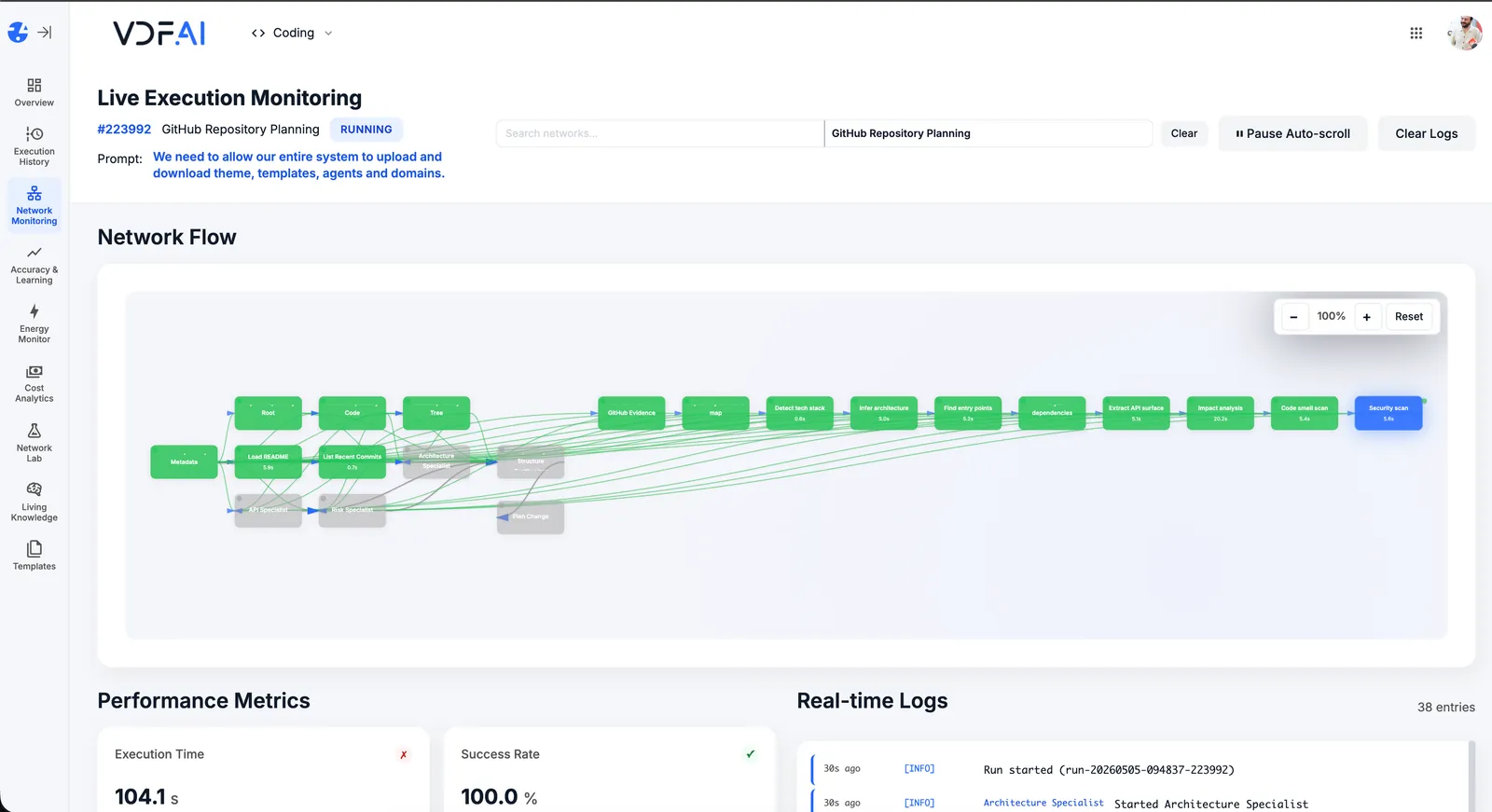
Live Execution Monitoring shows tool calls, retrieved chunks, and final replies. Accuracy Testing replays curated questions on every change.
OUTCOMES
What support leaders see in weeks, not quarters
more questions resolved by L1 without escalation.
customer messages or PII leaving your network.
of answers cite a source from your indexed knowledge.
SEEMR REFERENCE
Quality improves the more your customers ask
Every successful resolution, escalation, and CSAT score feeds the SEEMR learning modes. Routing rules and agent personalities re-tune themselves — without engineering changes.
FREQUENTLY ASKED QUESTIONS
What CX leaders ask before shipping VDF AI to a support team
How is this different from a hosted customer-support chatbot?
A hosted chatbot sends every customer message to a third-party model. VDF AI keeps the message, the retrieved context, and the back-office tool call inside your network. The model can be cloud or on-prem — that choice is yours per domain.
Can the support agent take action, not just answer?
Yes. Any back-office capability you expose as a Custom HTTP tool — order lookup, refund, address change, ticket create — becomes a callable action for the agent. Tool calls are typed, audited, and rate-limited by AgentsHub.
What happens when retrieval has no good match?
The agent is prompted to escalate cleanly rather than invent. It returns a structured "no-match" response with the search query, the top low-confidence hits, and a suggested handover path. Escalation is itself a measurable outcome that SEEMR learns from.
How do we measure quality over time?
The Accuracy Testing module replays golden questions against the latest network on every change. Live Execution Monitoring captures CSAT, resolution rate, and tool-call success rate. SEEMR uses those signals to tune routing.
How fresh is the indexed knowledge?
Re-indexing runs on a schedule configured per source. Source changes can also be webhooked to trigger immediate re-indexing of affected chunks. Effective dates and version metadata are stored alongside each chunk.
Do we need to retrain a model for this to work?
No. RAG plus careful prompt design covers the majority of support questions. Fine-tuning is optional and is a separate playbook — start with retrieval, fine-tune later if the data clearly justifies it.
RELATED PLAYBOOKS
Continue exploring grounded, on-prem agents



GET IN TOUCH
You Have Questions
Tell us what you’re trying to achieve—governed AI Networks, enterprise RAG, deep integrations, or on‑premise deployment. We’ll help you map the right architecture, security posture, and rollout path. If you’re moving beyond AI pilots and need scalable, auditable execution, reach out—our team is ready to help.